




Stronghold AntiMalwareEliminate spyware and adware as easily as in two clicks
Use award-winning antispyware and antimalware protectionFast, easy, and handy, Stronghold AntiMalware protects your computer against malicious programs, doing harm to your computer and breaking your privacy. These programs include spyware, trojans, adware, trackware, dialers, keyloggers and a lot of other kinds of threats. Stronghold AntiMalware scans your hard disks, registry and processes and removes all malicious software found. It also removes malicious BHOs and tracking cookies. Standard anti virus software can do nothing against privacy breakers and malicious programs like that. Choose Stronghold AntiMalware as you antispyware security keeper to be sure your computer is clean and fine tuned. Are you sure your computer is clean of spyware and other malicious software?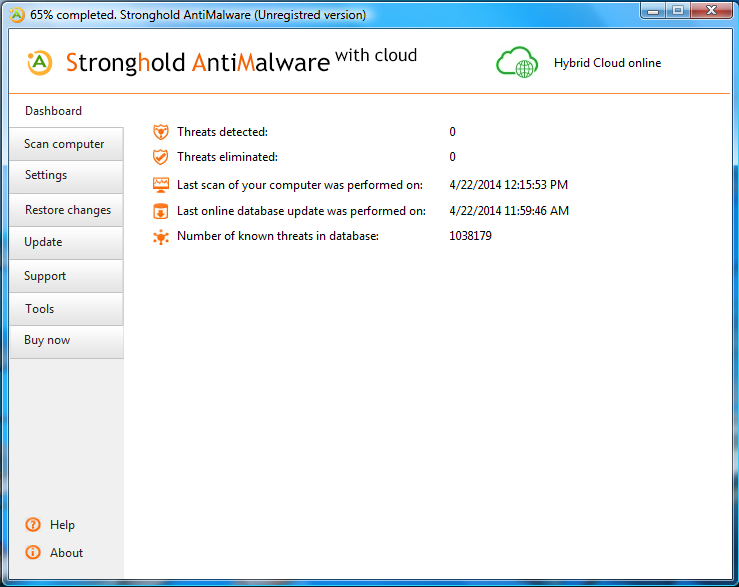
One hundred new items of malicious software and spyware appear every day. Are you sure your currently security software provides as much guard for your PC as you think? Those dangerous programs do not choose which computer to attack because they have something prepared for each one. Your PC is in the attack-list of spyware or adware as well. Stronghold AntiMalware protects you from the black side of the InternetIf you use the Internet every day, you are not safe, even if you use anti virus and firewall. Online pests can still freely take root in your system. Spyware and adware can steal private information and destroy important documents. One day we realized this problem and developed Stronghold AntiMalware to help you to solve it. Stronghold AntiMalware is your final step on the road to safety and comfort. Let professionals guard your security and privacy while you working or entertaining with your PC. Let's say "No" to spyware and adware together! Rely on our extremely large and still growing database of known infections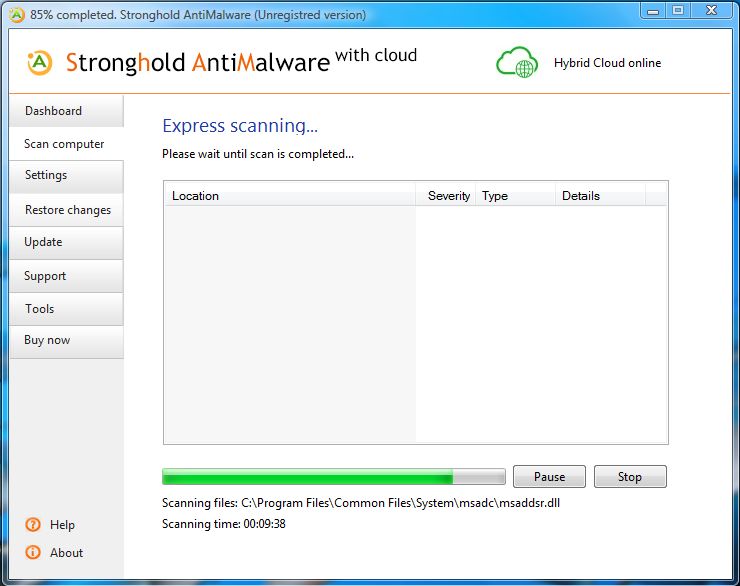
Database is of primary importance when fighting with viruses and spyware. Taking into consideration fast speed of computer viruses spreading our labs update Stronghold AntiMalware’s database every day and even more often when needed. Knowledge is power, after all. The more spyware items security software knows - the more powerful its protection is. Remember that at the meantime Stronghold AntiMalware's database contains over 3,000,000 pieces of different PC threats including spyware, adware, trojans, dialers, trackware, keyloggers and a lot of other kinds of malicious software. Stronghold AntiMalware scans everywhere, not just in memory and filesStronghold AntiMalware software is a precise scan for your computer. It scans every place where spyware can strike its roots, and not just common places in registry and files, like some other programs. Stronghold AntiMalware provides rapid scanning of system memory, hard drives, floppy drives, CD-ROM drives and removable devices. It scans run processes, system files, user files, program files and whole registry to find and solve problems connected with different types of malware: spyware, adware, trackware, dialers, keyloggers, trojans, rootkits, BHO (Browser Helper Object), tracking cookies, privacy breakers and much more. This is just a small extract from the list of dangerous programs Stronghold AntiMalware rapidly finds and removes. Work without performance loss while Stronghold AntiMalware does its job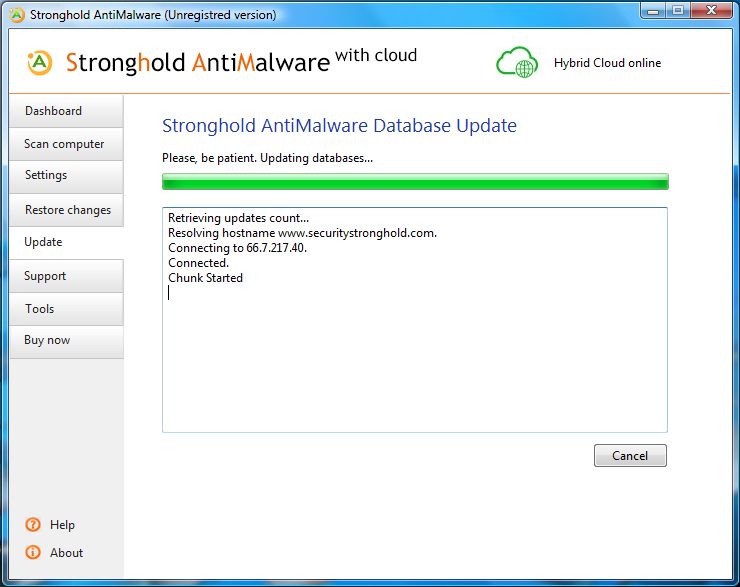
Stronghold AntiMalware functions according Passive Defense Approach (PDA). What does it mean? Unlike active shielding and pro-active protection software that scans all processes stored in system memory over and over again, causing dramatic loss of performance, Stronghold AntiMalware scans PC areas chosen beforehand, on demand. You mark the areas of your PC that you want to be scanned, then click the button – and Stronghold AntiMalware easily finds and removes spyware and adware from your system. Another benefit of using Passive Defense Approach is that Stronghold AntiMalware will find spyware or adware in any place, wherever it exists in your system and without regards if you already accessed it or it still waits to be executed. On the contrary, active defense programs identify threats only when you yourself try to access the infected files. Powerful anti spyware engine lets Stronghold AntiMalware outperform competitorsStronghold AntiMalware diagnoses and eliminates all known kinds of spyware and malicious software. Spyware, adware, dialers, trackware and other kinds of malware are identified with help of the database of known threats built into the program and regularly updated via the Internet. When scanning some particular file or registry entry, Stronghold AntiMalware compares item’s characteristics with the characteristics of the records present in its database. In case it finds absolute match, it displays definite name of the threat. If exact definition of suspicious program is not present in the database, the program compares separate components of the suspicious program and recognizes its possible type, warning user about latent infection. Stronghold AntiMalware deletes any threat found during its scan, so you may be sure your computer is clear of spyware and adware if you scan it at least once a week. Why should I choose Stronghold AntiMalware and not other products?There are only three reasons, but they really make difference:
Key featuresBefore you realize, that Stronghold AntiMalware is exactly what you need to complete shield against spyware, adware, Trojans, and other kinds of malware on your PC, look through True Sword's key features. General
Anti spyware database updates
Interface
Q: Which kinds of infections does Stronghold AntiMalware fight with? A: Stronghold AntiMalware scans for and eliminates spyware, adware, Trojans, dialers, trackware, browser hijackers, porn software, badware, problemware, tracking cookies, malicious BHOs, malicious host entries and even some special kinds of viruses. Q: Is Stronghold AntiMalware anti virus program? Can it fight with viruses? A: While Stronghold AntiMalware knows a lot of viruses and fights with them successfully, please remember that Stronghold AntiMalware is not anti virus tool. Stronghold AntiMalware is an antispyware and antimalware tool and its primary goal is to kill spyware and malware. You should use some classical anti virus program to accompany the protection Stronghold AntiMalware gives you. Q: What if I have some specific infection that I want Stronghold AntiMalware to fight with? A: You can purchase Stronghold AntiMalware keeping in mind our 30 days satisfaction policy. If for some reason Stronghold AntiMalware can’t help you with some specific problem, our support team really can. They will work with you free of additional charge until your problem is solved. If we can solve your particular problem within one week from your initial request, we perform a full refund of your order. Q: How regularly do you update anti spyware database of Stronghold AntiMalware? A: As a rule, new updates are available once per day. However, in some dangerous cases we issue new updates even more often. We do this to protect our users from malicious newcomers which sometimes spread over the Internet with a speed of a fire in a forest. Q: Will Stronghold AntiMalware warn me when my anti spyware protection is outdated and offer to update anti spyware database online? A: Yes, sure, it will. Moreover, you can define how often should Stronghold AntiMalware check for available updates. You can also switch such notifications off if you prefer. Q: I do not have direct Internet connectivity as of now. Can I update Stronghold AntiMalware in some other way? A: Of course, you can. Stronghold AntiMalware can be updated not only from the Internet, but from the local file as well. You can download anti spyware update from your web site or ask your network administrator to do this, then update from the local file or from the network location. Q: What is Problemware? I never met such term before. A: Problemware is legitimate software which has no malicious purpose, but which in some cases and in some environment can do harm to your computer or affect its performance dramatically. This doesn't mean that you should uninstall such program immediately. On the contrary, feel free to use such program until you notice any problems connected with it. In case Stronghold AntiMalware finds some problemware on your computer, it warns you of the probability of the problem, not of the problem itself. Your question is not listed here? Contact us and receive reply in 12 hours or even less! |
Help Me Choose Let us ask you several quick questions and recommend the best solution you need. 
Other Products 
Stronghold Antivirus Lightweight and easy to use antivirus and antimalware for every day 
Security Suite All-in-one anti spyware and anti virus protection for every day 
All products listed here work with Windows 7 and Windows Vista as well as with Windows 2000/XP/2003 |



Copyright © 2026 Security Stronghold. All Rights Reserved. All content on this website is protected and belongs to Security Stronghold LLC.